Showing posts with label Social Media MKTG. Show all posts

Tuesday, May 3, 2016

MKTG 347/Week 14: 3 Things To Consider Before Posting to Social Media


In order to get the most value out of using social media, there are different elements that need to be considered. Posting random content at randoms times will not be effective. So, take the time to decide who your target audience will be, what kind of content you will be posting, and how much time you will spend on creating or curating content for the week. Once you have a plan, your social media campaign will be much more effective.

Target Audience/Industry: One of the first elements to consider is who your target audience is. Depending on your product or service, you might have one target audience, or you might have a few. It all depends on a few characteristics.

Take the time to define the buyer personas in the industry. For instance, if you are trying to get the word out about a new brand name makeup store, one of your obvious target markets would be young women, who have a steady income so that they can splurge on makeup purchases. Once you define your target audience, you can determine the best site to use to reach them and know what content to use to get the best results.

Type of Content:  Having a lot of content with no feedback or interaction will not help you have a successful social media campaign. You want to post content that your target audience will find interesting and interact with. It is essential to have a variety of content to see what your audience interacts with the best. Instead of posting about your blog article every week, share a video or an image, or share an interesting article written by someone else. It takes time to plan the content in order to get the best results.

How Much Time to Spend: The amount of time that you need to spend planning your social media posts varies from company to company, but there are a few models that you can follow. A marketing company called Pardot, outlines a way to complete what you need to through social media in just 30 minutes a day. With this outline, you would spend 10 minutes on Twitter, six on Facebook and LinkedIn, four on Pinterest, and two on Google+ and Instagram. While you are on these sites, use the time to respond to direct tweets or comments and engage with the company page.

In order to get the most out of a social media campaign, it is helpful to take the time to plan. Thinking about your  target audience, the content you post, and the amount of time you should spend each day on these social media sites, will help your brand have a successful social media presence.

Monday, April 18, 2016

MKTG 347/Week 13: Scheduling Posts using Hootsuite

Whether you're in college, work a full time job, or maybe even do both, it can be hard to find the time to do everything that needs to be done throughout the day. Remembering to stay up to date with social media accounts is just another task added to the many that need to be completed. Hootsuite makes the issue of not having the time to sit, create, and post content to social media accounts disappear.

By scheduling posts you can save time and are able to think about the content you are posting ahead of time, which will only help to improve your social media presence.

Scheduling posts using Hootsuie is simple, but if you have never had any experience  with this tool before, it could be confusing at first. Below are some basics so that you can get started with scheduling your content to multiple social media platforms.

Compose Message: 


When you first login to Hootsuite, you will see something like the picture shown above. In order to start the process of scheduling your first post, drag your mouse over where it says "compose message" and this screen will appear:


Choose a Network: 
Once you see an image like the one above, you can start to compose your message. After you add the text you want everyone to see, you can look over to the left and choose which networks you want the post to be published to. You can schedule the same posts to multiple networks. If you want the same message to be posted to your Facebook and LinkedIn accounts, that can easily be accomplished. 

Set the Time and Date: 
After choosing the networks you want to post to, you need to schedule the time at which you want the content to be posted. 

Once you have set a date and time, you have the option to receive an email when the message is set, and you can also double check the date by looking at the date in publisher. 

After entering all of the information above, simply click save and your post will be ready to be uploaded!

Monday, April 4, 2016

MKTG 347/Week 12: Hootsuite Basics

Most companies today have a Facebook, Twitter, LinkedIn, Instagram, and other accounts to keep up with their social media presence. While it is great to have multiple accounts, it can become a hassle to keep posting new content on a continuous basis. This is where Hootsuite is extremely useful.
What is it? 
Hootsuite is a website that allows you to post content to multiple social media sites. Not only can you post to more than one site, but you can also schedule the time and dates of when you want the content to be posted. So, Hootsuite is a time saver. Within just a few hours you can have a months worth of content planned out and ready to be posted.

How to Get started:
Getting started is very easy. If you are just using Hootsuite to gain some experience, I would suggest registering for the free account. Once you create an account, you will go through the process of adding social media networks. Even if you do not have official accounts you can practice with your Twitter, Facebook, and LinkedIn accounts.

Using Hootsuite: 
After adding your social media sites, Hootsuite gives you the option to add streams and go through steps to get you started. If you have never used Hootsuite before this can be helpful to watch and it doesn't hurt to go through because you can exit the wizard set up process at any time.

If you are not sure where to start, Hootsuite University could be a helpful tool for you. This online section allows you to explore Hootsuite a little more and become more comfortable with the process of uploading content. You can view videos, webinars, and even on demand webinars through this section.

If you are trying to manage multiple social media platforms, you should take the time to become familiar with Hootsuite. Through this site, you are able to post scheduled content on a regular basis to multiple social media sites, which will save you time and help increase your ROI.

Tuesday, March 15, 2016

MKTG 347/Week11: Facebook Insights

If you have read any of my previous posts, you should be at least somewhat aware of a few social media platforms and how they are used to enhance social media marketing across the web. Facebook, LinkedIn, and Twitter are some of the major platforms that allow social media marketers the chance to reach various audiences across the world. It is fairly simple to set up an account or page, and even start a marketing advertisement or campaign, but it is essential to know how to track your results and what they mean.

Facebook Insights is a free tool, that allows you to track user interactions on a Facebook page. After looking at the insights page, you will be able to better understand your audiences. As a result, you will known what content users respond best to, and when to post that content to get the highest levels of interaction possible.

I tried looking at the insights through the Facebook page I created during week 3, but I was unable to do so. After scanning the page looking for insights several times, I turned to Google for some help. I found that in order for insights to appear, 30 people must like your page and it can take several hours to show up. So, after receiving 30 likes for your page, here are a few metrics insights can help you track.

Likes: If you click on the "like" tab under the insights page, you will be able to see the different demographics of people who have liked the content posted on your page. You will be able to see if more women like your page then men and adjust accordingly. Insights also lets you see where the traffic is coming from. In addition, you can see unlike and even search by new likes. All of this information will help you build personas of your target audience and adjust your content accordingly.

Virality of Content: You can be posting content on a regular basis, but it is helpful to know how successful that content actually is. Insights allows you to check the virailty of whatever you post whether it may be photos, videos, links, posts, or questions. From looking at this information you will become aware of how many users engaged with a post and how the word was spread about that particular post.

Reach: Who your content is actually reaching is an important factor to know when participating in social media marketing. The reach area allows you to see what channels are the most effective to get people to view your content. You can see what searches were organic, paid, and viral which will help you determine which area needs to be increased to maintain a better reach.

Getting your content out to the public and knowing who responds to that content is essential for effective social media marketing. Facebook insights is a free and helpful tool that provides useful information about demographics and who your content is reaching, so that you can determine what changed need to be made to your online strategy.

Tuesday, March 1, 2016

MKTG 347/Week 10: Twitter Basics

In my previous posts I have talked about Facebook and LinkedIn, but I have still not touched on discussing Twitter, which is another major social media platform used for marketing purposes. Just like Facebook, anyone can create an account on Twitter. Whether its for a company, non-profit, or just a person, Twitter allows people to stay connected and interact on an instantaneous basis from around the globe.

At first you might not think a tweet of 140 characters or less would have much of a marketing impact, but it does. Here are some basic about Twitter and why it is beneficial to use.


Two-Way Conversations: Twitter is an interactive social media platform that facilitates conversations. When someone has an issue, or is unsatisfied with a product or service, they tend to turn to social media to voice their concerns. With a twitter account, brands and companies can respond to these concerns quickly.

Hashtags and Trending Topics: Today, most companies have a Twitter account.With the use of hashtags and trending topics, it is simple to see what people are saying about your company. It also allows other customers to communicate to each other any concerns or problems they encounter, because more often than not, more than one person under-go's the same issue.  Even if you aren't using Twitter to run ads, you can still use it to re-tweet customers and address their concerns. The faster a concern is addressed, the better it is for your company.

ROI: You might have seen the term ROI mentioned briefly throughout my other posts, but if not ROI stands for return on investment. In order for social media to be an effective and efficient use of funds, the ROI needs to be greater than the money spent running campaigns. Just like on Facebook, Twitter can be used to include promotions, offers, and coupons. 

One way to track the ROI from twitter is by using a tool called Argyle social. This tools lets you link your social media accounts to the site and then report on the results. So, you are able to see how many sales resulted from Twitter ads and campaigns. 

Twitter is a social media platform that can be a great marketing tool for companies and brands if utilized correctly. The two way conversations, use of hashtags, and the capability to track ROI are just some of the many reasons Twitter is social media platform worth looking into.  

Tuesday, February 23, 2016

MKTG 347/Week 7: Social Media Personal Branding

When attempting to find a job, personal branding plays a major factor. Throughout the job hunt you are trying to showcase your best qualities so that potential employers will take an interest in you. Many of us already practice selling ourselves by making our resumes as professional and impressive as possible, and try our best to make a lasting impression if an interview is granted, but there are other ways to promote yourself and this starts with personal branding through social media.

Have a Clean Social Media Presence:Employers can easily search the web and be able to check out applicants social media accounts. According to a social media recruitment study done by CareerBuilder, in 2015, 52 percent of employers used the social media platforms to research their applicants. Many employers come across bad mouthing other employees, inappropriate language and pictures, bad grammar, and discriminatory remarks, which causes the employee to no longer be consider. So, it is important to make sure you have a clean social media presence on sites such as Facebook and Twitter. 

Once you have a clean social media presences, there are ways to utilize social media platforms to create your personal brand. The way to do this is through LinkedIn. Currently, LinkedIn has 350 million users from over 200 countries, so it is a great way to make connections and get your name out to the field you are interested in.

In order to properly build your personal brand, there are a few steps you should follow.

Fill out the entire profile: This includes things as simple as uploading a picture and providing background information about yourself. LinkedIn allows you to post a summary, showcase your skills, and even receive endorsements from others. The more information you have filled out, the better. 

Build connections: Unlike Facebook and Twitter, LinkedIn is more of a professional networking platform. There are millions of users from countries around the world that you have the ability to connect with by a simple click of a button. In order to find connections, all you need to do is go to "people you may know" tab, or you can run an advanced search and connect with alumni, co-workers, and friends. You can also join groups that you are interested in and make connections through there. 

Be Active: Even if you have a profile that is completely filled in and over 300 connections, that does nothing if you are not active. Like any other social media platform, posting content is expected. So, use your profile to showcase your work, share a blog post, or just start a discussion over a topic that you have an interest in. Read through what others have to say, and comment on their posts to help build your online presence. 

Social media platforms are a great way to build your personal brand, if you use them correctly. So, remember to keep your social media presence clean, and use LinkedIn to showcase your work and stay connected with others. 

Monday, February 15, 2016

MKTG 347/Week 5: Facebook Pages

By now, most people are aware of Facebook and how it works. Some use the site for personal uses while others use it as a marketing tool. Facebook is one of the many ways to market your business and there are different approaches that you can take.  For instance, you can pay for an ad campaign, or you can create a promotional page.

It is fairly simple to create a Facebook page for your business, and unlike the ad campaign, it is free. There are pre-designed templates to choose from based on different categories. For instance, when you get started, Facebook will ask if your page is for a business, company, brand, artist, entertainment, or a cause.

Once you pick the template you want for your page, you are asked to fill in other information such as the name of your company or brand, uploading a profile picture, and what your page is about. You can also customize your page reach to certain demographics. So, if you want people from the United States and Canada who are in their mid twenties to see your page, you can add that in.

After you have your page up and running, you should be posting and  sharing content on a regular basis. Just for the experience, I made a Facebook page to promote my marketing blog. After setting up the page and placing a direct link to my blog, I shared one of my blog posts and asked people to go check it out.

Even though it was free to create the page, Facebook offers ways to promote the page by getting more likes. This is called a boost and the price starts at $5. So, it is important to be aware that even though the page was free, additional marketing techniques do cost money.

Facebook is an inexpensive way to promote your company and gain some exposure through social media. Although some features do entail a fee, there are many free features, such as creating a Facebook page, that you can utilize.

Monday, February 8, 2016

MKTG 347/Week 4: Content Skills

When you want to know a little about tea cup piglets, you turn to Google to find some helpful articles, pictures, and information, but did you ever stop to think where that information, or content as we will call it, came from? Some of the content is from professional websites, but others are from personal blogs. When it comes to social media content, there are three types of content that are important to familiarize yourself with include curation, creation, and collaboration.

Whether you are generating your own content, or sharing what you find interesting, it is important to have some type of content to boost your social media presence. In order to develop social media marketing as a skill, there are a few steps to take to get started.

Start a Blog: An easy way to create a blog is to make one using blogger.com. All you need is a Gmail account and you can get started. Even if writing isn't your strong suit, try it out. It is important to remember to blog on a regular basis. After writing a new post, share the link on social media sites such as Facebook or LinkedIn so that people become aware of the content you are producing.

Create a Website: If you are working for a company, trying to show off your portfolio, or starting a new project, having a website would be useful. There are a number of websites that allow you to create your own webpage. Wordpress and Google Site are two of the websites that offer free versions with various templates to get started. So, even if you don't have technical skills it is still possible to create your own site to display your work.

Make/Edit Video: Even if you have never had any prior experience with creating or editing videos, it is fairly simple to get started. All you need is an iPhone, iPod, or any smart phone with video capabilities to begin. Great content can be created even with a simple device. Once you have some videos, you can add them to YouTube where you can experiment with some simple edits to gain some experience.

When it comes to social media marketing, content is extremely important. Whether you share someone else's content or create your own, there are multiple ways to get that content out to others and expand your social media presence and skills.

Wednesday, January 27, 2016

MKTG 347/ Week 1: Social Media Basics

Today I have checked Facebook about three times, scrolled through my Twitter feed and of course took the time to check what's going on through Instagram. While many of us tend to use social media for personal reasons, such as keeping up on who's dating who this week, social media is a powerful tool when it comes to the world of marketing.

According to LinkedIn, social media marketing skills was one of the top skills that helped job seekers get hired in 2013. Most of us have been exposed to some form of social media, but there are a few key points to look out for when using social media sites to reach your market.
Image result for social media marketing
Know the ROI: Having Facebook ad campaigns and paid advertisments on other social media sites is a great way to get your product out there, but it is important to know the return on investment.This just means to be aware of  impact your social media marketing is making compared to the the money spent in order to accomplish that goal.

Consider the Target Market; One of the first steps in the process of social media marketing should be to determine if you are trying to market to consumers or other businesses. Business to business marketing will have a different approach than business to consumer marketing. The content will vary. For instance, a fun and catchy ad posted on Facebook would be useful for business to consumer marketing, whereas an informational article posted on LinkedIn would be more suitable for business to business.

Create Awareness: The purpose of digital marketing is to engage your audience through social media by means of promotions, videos, contests, etc. Once people are aware of your product and/or service, they can share what they know by word of mouth through their own social media channels.

In addition to using social media to spread the word, you ca also use them to listen. When people dislike something, chances are they will share their experience with others through sites such as Facebook or Twitter. So, instead of just using it to spread awareness, you can use these sites to listen to potential customers and improve.

Know the Channels: Two of the most common websites used to create awareness through social media are Facebook and Twitter, but there are others as well which include:
YouTube
Google+
Yahoo! Answers
Pinterest
LinkedIn
Instagram
Tumblr
Tagged

If you haven't heard of these websites. it is important to take the time to become familiar with them so that you can improve your online presence.

Experience with social media marketing is an important skill to have when entering the marketing field today. Even if it is completely unknown territory, simply becoming familiar with the websites above will get you started on the right track.

Monday, December 7, 2015

Tracking Conversions

Being present on social media is extremely important when attempting to increase your marketing experience and skills. One online site that is free and a great learning experience is Weebly. You do have the option to upgrade and pay, but the free version is a great way to get started and you can connect your website to Google Analytics to track your results.

Maybe you have never used Weebly before, so here is some background information. On Weebly you can:
-Have multiple pages: The basic pages to start with would be a Home page, About Us page, and Contact page
-Customize your pages: Weebly starts with a basic templates, but you can personalize the pages in a number of ways. There are a variety of layouts, pictures, and background images to choose from.
-Track Conversion: If you go under settings and click on the SEO tab, you can put in a tracking code straight from Google Analytics.

Tracking conversions might sound intimidating at first, but to get started you just need to follow a few simple steps.

1)Connect Weebly to Google Analytics: To do this, take the code directly from Google Analytics and place it directly into the footer code on your Weebly website.
2)Connect submission form to thank you page: When you connect a submit form to the thank you page, you can see how many people went through the conversion process. The results will show when you login to your account and look like this:
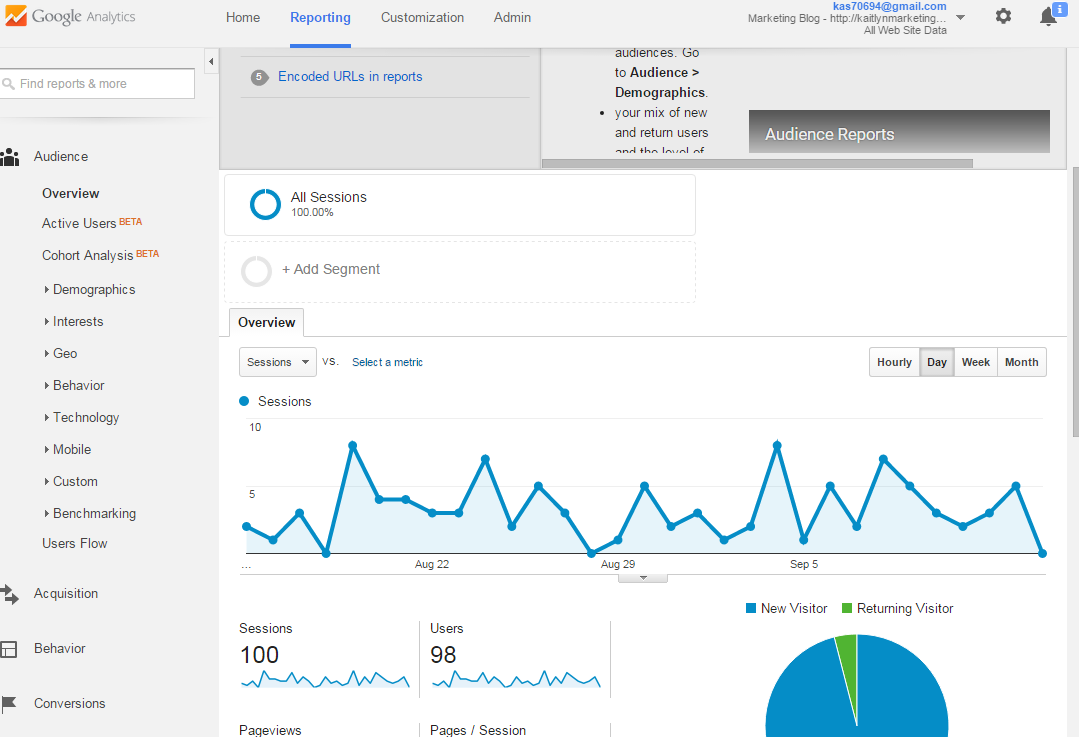
3)Check Google Analytics: To look at conversion rates in Google Analytics, simply go under the reporting tab. Once you are there, you will see a page that looks like this:


So, conversion tracking might seem intimidating at first, but if you follow a few simple steps, you will be started on the right path. By connecting your Weebly page to Google Analytics you can experiment and learn the basics of conversion tracking. 

Tuesday, October 13, 2015

CASA Marketing- Fun with Adwords

After doing the work to attempt to bring people to your website, it would awesome to be able to track conversions. Well, there's a tool that will do that for you! It's called Adwords and it tracks things all the way from the ad to the actual purchase. It's very simple to get started.


1)Set up an Adwords Account: To get started simple go to https://www.google.com/adwords/.

2)Create a Campaign: Although it was free to make an account, this is where you'll have to spend some money to start off the campaign. Don't worry, you might be spending some money now, but it will pay off in the future.

-Give the campaign a name: It can be anything that you would like, but I would suggest making it something simple that relates to the purpose of your campaign.
-Set a budget: If you're just trying to get some experience and learn from Adwords, $5 a day would    be a fair budget, but you can chose the amount that you think will suit your needs best.
-Enter a landing page: This will be the webpage that everyone sees after clicking on your ad. So, make sure it has great content and keeps potential buyers interested.

3) Experiment with Headlines: Here is where you should let your creative side shine. Think of words that will catch your audience's attention and make them click on your ad.

4) Use the Keyword Planner: Competition is part of social media marketing. The keyword planner tool allows you to search specific key words and see what the competition is for those words. If competition say "high" you might want to play around with other words to find some with lower competition.

5)Experiment with Ads: Try using a few different adds at once so that you can see which ones generate the best results. So, play around with the headlines, try using different keywords, and maybe even a different landing page.

Social Media marketing is competitive, but if you take advantage of online tools such as Analytics and Adwords, you can get the results that you desire. So, play around with these tools and remember that even though these ads may cost money now, they will pay off greatly in the future.

Tuesday, October 6, 2015

Tracking Google Analytics Results

In previous posts I have talked about why analytics is important and how to use it, but it is extremely important to know how to track the results you receive. On Google you can find many articles to help you get started with tracking your website results. In class I read an article titled, "The Six Most Important Web Metrics to Track for Your Business Website" and I found it to be particularly helpful.

To get started, there are a few areas that you should focus on.

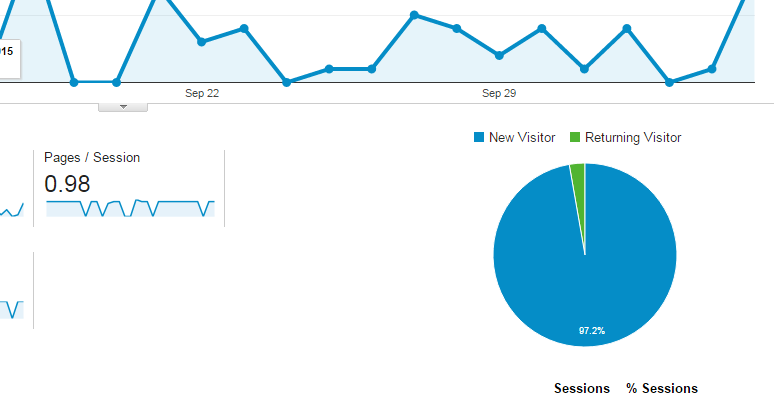
1) Visitors: It is always helpful to know how many people are visiting your website, but it is also helpful to know how many of those visitors are new, and how many are returning. To check this, you can simply look at the pie chart on the top right side of the page.


2) Referrals: Let's say your website has 9,000 new visitors. That's obviously great, but take that information and break it down even further. Find out where those new visitors are coming from. Are they from the Facebook Ad campaign you created, or are they from a website who you are cross linking? Once you find out where the traffic is coming from, you can use the information to make changes and attract even more visitors.


3)Bounce Rate: Okay, so now you know how many people are visiting your site and where they are coming from. Now it's time to take it to the next step, which is finding the bounce rate. If you are not familiar with what a bounce rate is, it is simply the percentage of single page visits. The point of knowing your bounce rate is that you want people to visit more than one page! You do not want visitors to just click and leave. So, if you know the bounce rate you can make changes to your content to get them to stay and click around some more.


4)Exit Pages: The bounce rate and exit pages might seem like they mean the same thing, but they don't. Exit pages are the pages that were last in the session. To check the percentage of exits go to <Behavior <Site Content <Exit Pages.

5)Conversion Rate: This is simply taking the number of conversion and dividing that number by the total ad clicks during the same time period. The higher the conversion rate the better!

6)Top 10 Pages: Knowing which pages on your website people like the best is crucial when making changes to your content. For instance, if you see a high exit rate when people go to you About Us page, but a low exit rate when people go another page, you know that you should make some changes to the About Us page.

At first Google Analytics might seem like an overload of information that is hard to understand, but it is actually very helpful and simple. You just find a place to get started, and following these steps are a great place to start!

Thursday, October 1, 2015

Facebook Ad Campaign Update

In my previous post I gave some information about how my ad was going on the fourth day. My ad is ending in about 4 hours, so here is a little update about how it went.


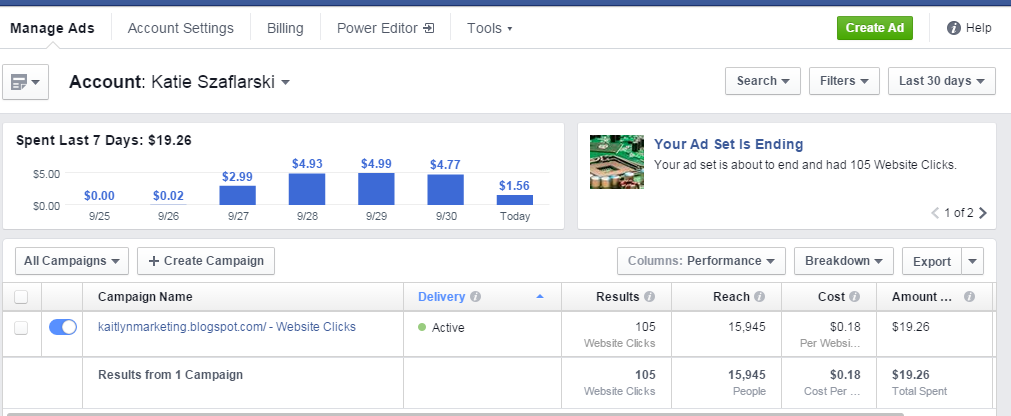
The campaign had a reach of 15,943 people.

From the reach of 15,943, I have received 105 website clicks.

So, my total click through rate is about 0.66 percent.

I have spent $19.26 from my $20.00 lifetime budget.

Per website click, I pay an average of $0.18.

Overall, my ad did get my website more views! Now I know what to change next time to get more views and gained some hands on experience with analytics.


Tuesday, September 29, 2015

CASA MKTG- Reviewing Campaign Performance

Even though I had a terribly hard time trying to get my Facebook ad up and running, it eventually worked!
So far, I have had the ad running for four days. Now it is time to see how many people my ad is reaching and how many people are actually visiting my blog.

Check Facebook Ads Manager: When you login to ads manager you should see a screen like this:


Now, it might seem like a lot of information that you don't know what to do with, but there are a few key features we want to look at:

Performance

First, we want to take a look at the total reach. The reach is how many people were able to see my ad. So far this campaign has a reach of 91,050 people. 

Then we want to see how many websites clicks I received. Which in this case was 53. 

I also want to know how much I am spending overall and per click. When I created my ad I set a lifetime budget of $20. So far, I have spent $9.49. Now let's take it a step further. I want to know how much I am spending per click, and this is $0.18. 

Audience

I am done looking at the performance, now I want to see the audience I am reaching. Is it a younger crowd, older, male, or female? By clicking on the audience button located next to performance, I can get my answers. When you click on the performance tab, you should see a screen similar to this:


By looking at the graph, I see that my ad is reaching the age range of 18-24 years old the most. Of that age group, I am reaching more males than females. So more of my websites clicks are from males. 

Now that I know a little about how my blog is doing, I can use the information I received to make changes and attract more visitors! 

Thursday, September 24, 2015

Creating a Facebook Ad Campaign

Making a Facebook Ad sound simple right? It seems like it should be, but I am having absolutely no luck! One of my class assignments was to create a Facebook ad for my blog, so that I can track the analytics. It sounded simple, and I thought it would take about 10 minutes to create, but I was sadly mistaken.

 When I first went to create my Facebook ad, I was taken to this landing page.


I clicked on "create ad" and proceeded to fill out some basic information. The page asked for information on who I am trying to reach, interests, demographics, and other various details. It's a great way to narrow your search and gain exposure....if it actually works.

Every time I hit the green "create ad" button at the bottom of the page, I ran into trouble. I kept recieving an error that said I had an invalid image. So, I tried a number of different images, changed the size and the file type, but it still didn't work. Now I was just getting frustrated.

I decided to do what everyone does when they don't know an answer: Google it! After Googling, I found the image size needed, but can you guess what happened? It still showed the same error.

At this point I was running out of ideas. So, I exited the browser and started from scratch. I was so sure this was going to work, but then I received yet another error.


I'm not too sure why it's not working. Maybe it's the computer, or maybe it's something very simple that I am overlooking, but I do know one thing. I will get it to work at least once this annoying loading symbol goes away!


Come back soon to see if I overcome my frustration and figured out how to make this ad campaign work! 

Tuesday, September 22, 2015

CASA MKTG- Blog Exposure

You can have the best content ever, but it does not serve its purpose if no one is able to view that content. In order to properly utilize Google Analytics, you need traffic, and its very simple to generate! If you are attempting to have your blog gain some exposure, follow these tips!

Pitch:  One way to get views for your blog, is to pitch the link to your friends on Facebook and connections on LinkedIn. For instance, you can say, "Please take a look at the link for my marketing blog below. I'm trying to generate data for Google Analytics and you can learn a little about marketing!"

Post: You can also share the actual post on Facebook and LinkedIn. To share on LinkedIn simply press the "share an update" button.

Promote: I have talked about the free ways to gain exposure, but you can also pay to promote. On Facebook, there is a pay to promote button, but it will help you gain exposure quickly and easily.


Making an ad on Facebook is another way you can promote your blog. By using this Facebook feature, you can customize your demographics to gain the exposure you desire. You choose the region, age range, interests, pictures, and create an ad you wan to be displayed.

Tip: If you decide to use a Facebook ad campaign to gain exposure, be sure to set a limit on the amount of money you want to spend. You can set a lifetime budget or customize the time period in which your ad will run.


Generating traffic may seem like a difficult task, but there are many options available, bot free and paid, to gain the exposure you desire!

Tuesday, September 15, 2015

CASA MKTG- Setting up Blogalytics

Blogalytics is exactly like it sounds. It is simply having a blog and using anayltics to track how the blog is doing. It is easy to get started because you only need two thing: A blog and an analytics account.

Creating a Blog: Maybe you have never written a blog before, but that's okay. To set up a blog, simply go to https://www.blogger.com. Once you're on the website, you will be able to choose a custom address and pick the layout that you would like your blog to display.

Tip: Once you have your blog up and running, remember to post content on a weekly basis.


Starting Goggle Analytics: If you have a G-mail account, all you need to do to access anayltics is to click on the Access Google Analytics button. If you don't have an account, visit http://google.com/analytics.


After you create and customize your accounts, you can connect the two of them. This way you will be able to see how many people are viewing the content that you are producing every week. To do this, you will us the tracking code that analytics provides you and copy it into your setting in tracker.


After your accounts are connect you can play around with the data provided in Google Analytics. You be able to see statics on things such as:

  • Page Views
  • Pages/ Sessions
  • Bounce Rate
  • Percentage of New Sessions
  • Average Session Duration


With the data that you gather from Google Analytics, you will be able to see how people are responding to your content and what types of content your viewers respond to the best. All of this feedback can help you improve your content and number of viewers.

Tuesday, September 8, 2015

Casa MKTG- Why You Should Care About Analytics

Things change, especially in the marketing field. As things change in the field, the need for certain skills also change. At the time being, there is a high need for skills in involving social media marketing, digital and online marketing, and business intelligence. All three of these areas relate directly to analytics.

If you are interested in gaining some experience with analytics there are a variety of tools, both paid and free, that you can use.

Google Analytics: This particular tool is free, and it is a great place to start. I recently attempted to take the Goggle Analytics Quiz to get certified and this tool provided me with free study material that helped me gain valuable information.


Adobe Analytics-Omniture: This web analytic tool is considered to be one of the best. If you have experience with this tool, it can certainly can help you when you are applying for jobs. Although it is helpful, unlike Google Analytics, it is expensive. There are certain things that Adobe Analytics can do that Google Analytics can't, and visa versa.


So, having experience with analytics can only help you in the search for a profession in the marketing field. If you are interested in learning more there are a variety of tools that you can utilize to accomplish your goal of becoming certified in analytics.