Thursday, September 17, 2015

WCIYP- Your New Resume

Almost everyone has used Google at some point in their lives.Whether it was to search for reviews online, find answers for homework questions, or just to browse funny cat pictures, most people have had some experience with Google. But now, Google has another major purpose: Being your online resume.

Google as your new resume can be great, but you must remember that if a potential employer Googles you, they can see the good and the bad. Here are some tips to make them see the good.

Edit and Fill: To start off, Google yourself and see what you come across. If you see something that could affect your chances of getting a job, take it down. Then, take the time to go through all of your social media sites and clean them up. While you are cleaning up your social media sites, make sure they are filled in as much as possible.

Filling in includes: Having a profile picture, adding in skills, mentioning past job experience, etc.


Expand Your Presence: The more active you are on the internet, the more recruiters will be able to see about your activities and involvements. To be more active you can:

  • Join groups and forums on LinkedIn
  • Utilize Twitter
  • Start a Blog
  • Add videos

Add: You already know that adding information to your social media profiles can help recruiters learn more about you, but another way to get noticed is by putting your actual resume on Google. Yes, you can do that. Just make sure to post it some where that the recruiter will be able to find.

For some tips on creating a great online resume check out this helpful post from Mashable.

Tuesday, September 15, 2015

CASA MKTG- Setting up Blogalytics

Blogalytics is exactly like it sounds. It is simply having a blog and using anayltics to track how the blog is doing. It is easy to get started because you only need two thing: A blog and an analytics account.

Creating a Blog: Maybe you have never written a blog before, but that's okay. To set up a blog, simply go to https://www.blogger.com. Once you're on the website, you will be able to choose a custom address and pick the layout that you would like your blog to display.

Tip: Once you have your blog up and running, remember to post content on a weekly basis.


Starting Goggle Analytics: If you have a G-mail account, all you need to do to access anayltics is to click on the Access Google Analytics button. If you don't have an account, visit http://google.com/analytics.


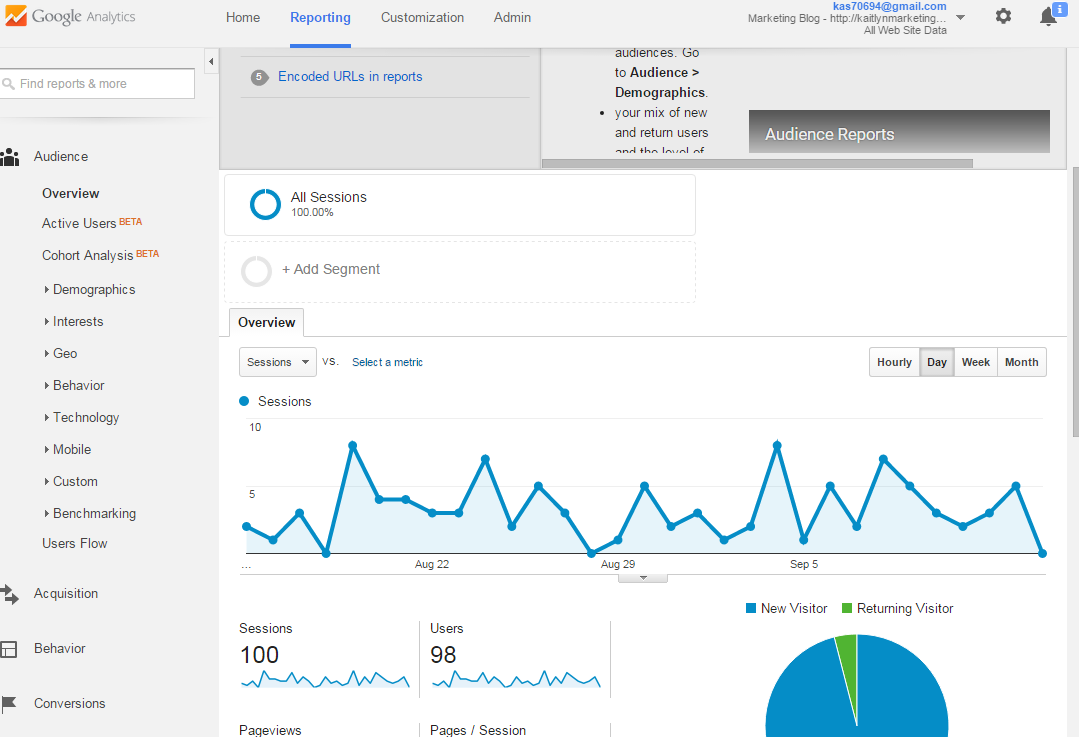
After you create and customize your accounts, you can connect the two of them. This way you will be able to see how many people are viewing the content that you are producing every week. To do this, you will us the tracking code that analytics provides you and copy it into your setting in tracker.


After your accounts are connect you can play around with the data provided in Google Analytics. You be able to see statics on things such as:

  • Page Views
  • Pages/ Sessions
  • Bounce Rate
  • Percentage of New Sessions
  • Average Session Duration


With the data that you gather from Google Analytics, you will be able to see how people are responding to your content and what types of content your viewers respond to the best. All of this feedback can help you improve your content and number of viewers.

Tuesday, September 8, 2015

WCIYP- How to Adapt to Job Hunting in the 21st Century

After the economic crash in 2008, it has been increasingly difficult to find jobs. Although many people believe it is this way because there are no job available, that is not the case. Yes, full time jobs are harder to find, and it seems like you send out countless resumes that never receive a response, but this is because employers changed, and job hunters didn't.


The book titled, "What Color is Your Parachute?" gives some valuable insights to aid you in the job searching process. In order to better the odds of landing a job, job hunters must speak the same language as the employers. Job hunting is a process and there are a few tips to follow to make the process go as smoothly as possible.


Use Online Resources: Job Boards can be a useful way to find job openings and send out your resume. Some common ones include Careerbuilder and Monster.com. In addition to job boards, it can be helpful to use social media. Sites such as LinkedIn, Skype, Facebook, and Twitter have become more popular in the job hunt process over the past few years.


Determine Your Search: Don't just look for a job that requires skills that you know. Instead, look for jobs with the skills you love to use. Being passionate will help you throughout the process.


Notice the Interview Time: Employers have stacks of resumes for just one available position. If you are fortunate enough to land an interview, be aware of the time. Follow the 20 to 2 rule, meaning that you should keep your answers between 20 seconds and 2 minutes. Also, don't spend the majority of your interview talking. Let the interviewer talk just as much as you do.


Send a Thank You: Taking a few minutes after your interview to type up an email saying thank you for your time, can give you an advantage over other candidates. I had an employer tell me that she was highly impressed by the follow up email I sent after my interview, and that played a part as to why I received the jobs over the other candidates.


Landing a job might seem like an intimidating and frustrating process, but it is possible. Just remember to follow these few tips and keep trying!

Casa MKTG- Why You Should Care About Analytics

Things change, especially in the marketing field. As things change in the field, the need for certain skills also change. At the time being, there is a high need for skills in involving social media marketing, digital and online marketing, and business intelligence. All three of these areas relate directly to analytics.

If you are interested in gaining some experience with analytics there are a variety of tools, both paid and free, that you can use.

Google Analytics: This particular tool is free, and it is a great place to start. I recently attempted to take the Goggle Analytics Quiz to get certified and this tool provided me with free study material that helped me gain valuable information.


Adobe Analytics-Omniture: This web analytic tool is considered to be one of the best. If you have experience with this tool, it can certainly can help you when you are applying for jobs. Although it is helpful, unlike Google Analytics, it is expensive. There are certain things that Adobe Analytics can do that Google Analytics can't, and visa versa.


So, having experience with analytics can only help you in the search for a profession in the marketing field. If you are interested in learning more there are a variety of tools that you can utilize to accomplish your goal of becoming certified in analytics. 

Tuesday, April 14, 2015

SEN Linking Best Practices

SEO best linking practices


In a previous blog, I mentioned the three types of linking: Reciprocal, one-way, and triangular. While knowing the different types is important, it is also essential to know practices that matter while link building.


  • Keyword Anchor Tags

         The are numerous ways to write the anchor test, but there are some ways that are better than                others. If you want your anchor text to be the most powerful, follow this example:

      <ahref=“hXp://domain.com/page.html”>Keyword</a>

        If you are trying to go the safer route, use this example:

      <a href=“hXp://domain.com/pages.html”>www.domain.com/pages.html</a>

       Which ever way you choose, make sure not to overdo the keywords! Google's Penguin Update             targets sites that use too heavy keyword link profiles and they keep tightening the restrictions.


  • Location  

          Just  having the link visible somewhere on the page isn't good enough. Links that are in the                 content and header areas are treated more important than other. Remember to make your links             relevant to your site. If they aren't, you will have a lower rank even if everything else is ideal.


  • Code 
         The first link in the HTML Code is the one that matter the most. So, make sure it is exactly the            way that you want. Most of the time secondary links are ignored, unless a #hashtag is used. 

Other various factors include

  • Font size/color
  • Location
  • Number of words in anchor text
  • URL
  • Number of links on the page
  • Page authorship
  • Click through rate
  • Language
  • User Behavior 

Thursday, April 2, 2015

Check Out These Marketing Blogs!

Want more information on SEO?


Check out these blogs for more marketing information! 


SEO Loading Speed

loading speed

We live in a world where everyone wants everything instantly. If a web page takes more than 20 seconds to load, we get annoyed and just try going to another page. Speed is an important factor when it comes to optimization. Not only do people hate slow web pages, but Google is adding speed as a new ranking factor into its algorithm.

This means that Google will be putting faster sites higher in the search results, so slower ones will be harder for people to find. Since speed is such an issue with everyone, Google is trying to take steps to avoid the slowness of certain websites. So, if you want your website to be fast and seen you need to crank up the speed.

The ranking of speed won't be set on a specific number, but it needs to be just as fast as the competition. A sites average load time is dependent on the niche. So, if you have tons of photos and videos, your website will take longer to load. To attempt to make your load speed faster, there are a few tools that you can use.

The firebug plug-in is one tool that allows you to check the speed of your website and make changes to it. It also helps if you install Google's Page Speed with this so that you can have two tools that evaluate the speed.

What to check for:

• Script Language 
Using Flash can be a concern. The visuals and graphics take time to load and run which can slow down the speed of the site.

• Hosting Server Speed
A good number of people find that their hosting server is what is slowing their website down. To fix this, revise your providers SLA to determine the bandwidth and speed allocation.

 • Coding Quality
Google has resources available that can take your Java script code and condense it to the minimum requirement. By doing this, you speed up the loading time and you can test out how fast your site is going.
 • Picture Resolution 
The higher resolution your images have, the longer it takes to download, which means a slower loading speed. So, cut down the resolution to the minimum amount.

• Bulky Applications 
Adobe applications have some of the slowest loading speeds, and this is a concern for people who practice SEO. Try minimizing the number of the bulky applications, but this problem is inevitable.