Thursday, October 8, 2015

WCIYP- Salary Negotiation

Okay, so you made it through the dreaded interview process, and landed the job! You start on Monday and tell all of your friends and family the good news. And then someone says, "How much are you getting paid?" Uh...... you can't answer that question because you didn't ask. You do not want this situation to happen to you. Salary negotiation is an extremely important part of the interview process.

I know the term "salary negotiation"  may seem a bit intimidating, but you should always ask about it before accepting a job. You don't want to be working for $18 an hour when you could have been making $23.

You probably have some questions like when to bring it up? What to do if it isn't the amount your willing to settle for? Well, take a look at these few tips below that will help you along the path of the negotiation process.

Bring it up when....

  • You know your in the final interview. 
  • You know that they want you to work for them.
  • You know that you want to work for that company 

Uncover the Range: One of the purposes of salary negotiation is to figure out how much an employer is willing to pay you. They usually have a range in mind, so you have to find out what that is and use it to your advantage. Employers are trying to pay you the least amount possible, whereas you are trying to get the most amount possible. For instance, and employer might offer $20 and hour, but they can actual afford to pay you $30. Most of us would prefer $30 an hour, so don't let intimidation keep you from negotiating.

Don't Give a Figure First: ALWAYS let the employer be the first one to state a figure. For some reason when an employer mentions a figure first, there is more of a chance of getting a figure higher than what was originally stated.

Tip: Try to avoid giving a figure when asked question like, "What kind of salary are you looking for?" You might think they are trying to be nice, but they are just trying to get you to state a figure.

Do Your Research: Let's say this is the first office job you have landed, and you have no idea what an average salary looks like. So, do some research!

-Ask people: Maybe you know someone with a similar position in another company. So, take the time to ask them what their salary looks like so you can get a fair range.

-Use the internet: There are a handful of websites that help you find accurate salary information.


Some common ones include:
-www.salary.com
-www.bls.gov/ooh
-www.salaryexpert.com

Maybe you haven't had any experience with salary negotiation, but that's okay. Just remember that you never want to accept a job offer without know the pay. If you have no idea where to start or how to bring it up, just try following a few of the tips above!

Tuesday, October 6, 2015

Tracking Google Analytics Results

In previous posts I have talked about why analytics is important and how to use it, but it is extremely important to know how to track the results you receive. On Google you can find many articles to help you get started with tracking your website results. In class I read an article titled, "The Six Most Important Web Metrics to Track for Your Business Website" and I found it to be particularly helpful.

To get started, there are a few areas that you should focus on.

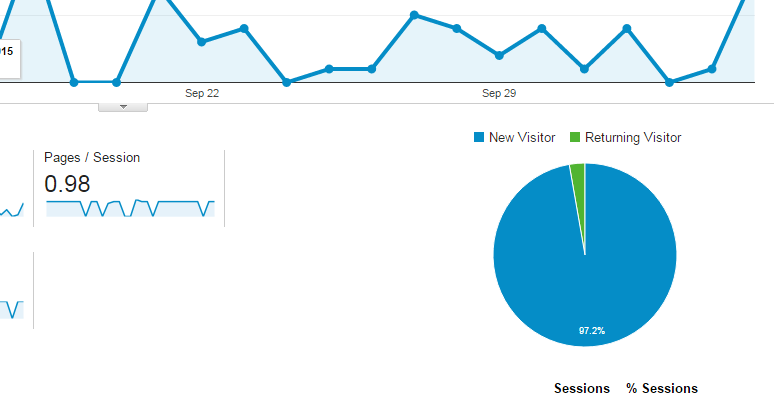
1) Visitors: It is always helpful to know how many people are visiting your website, but it is also helpful to know how many of those visitors are new, and how many are returning. To check this, you can simply look at the pie chart on the top right side of the page.


2) Referrals: Let's say your website has 9,000 new visitors. That's obviously great, but take that information and break it down even further. Find out where those new visitors are coming from. Are they from the Facebook Ad campaign you created, or are they from a website who you are cross linking? Once you find out where the traffic is coming from, you can use the information to make changes and attract even more visitors.


3)Bounce Rate: Okay, so now you know how many people are visiting your site and where they are coming from. Now it's time to take it to the next step, which is finding the bounce rate. If you are not familiar with what a bounce rate is, it is simply the percentage of single page visits. The point of knowing your bounce rate is that you want people to visit more than one page! You do not want visitors to just click and leave. So, if you know the bounce rate you can make changes to your content to get them to stay and click around some more.


4)Exit Pages: The bounce rate and exit pages might seem like they mean the same thing, but they don't. Exit pages are the pages that were last in the session. To check the percentage of exits go to <Behavior <Site Content <Exit Pages.

5)Conversion Rate: This is simply taking the number of conversion and dividing that number by the total ad clicks during the same time period. The higher the conversion rate the better!

6)Top 10 Pages: Knowing which pages on your website people like the best is crucial when making changes to your content. For instance, if you see a high exit rate when people go to you About Us page, but a low exit rate when people go another page, you know that you should make some changes to the About Us page.

At first Google Analytics might seem like an overload of information that is hard to understand, but it is actually very helpful and simple. You just find a place to get started, and following these steps are a great place to start!

Thursday, October 1, 2015

Facebook Ad Campaign Update

In my previous post I gave some information about how my ad was going on the fourth day. My ad is ending in about 4 hours, so here is a little update about how it went.


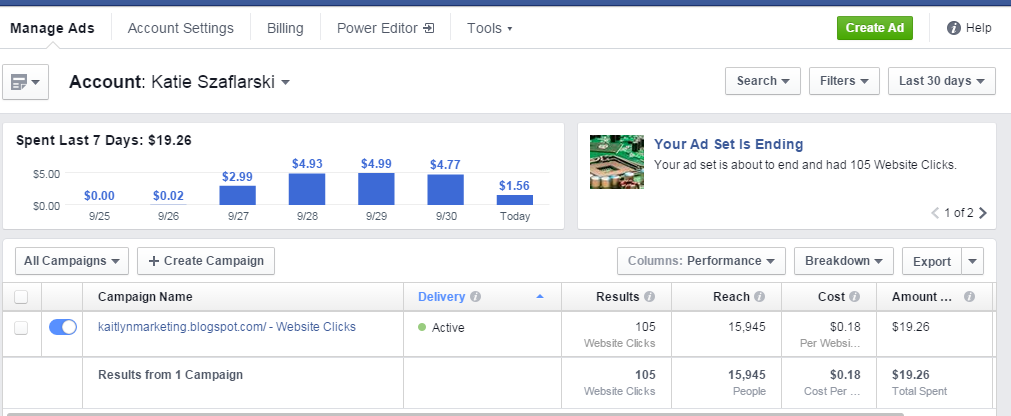
The campaign had a reach of 15,943 people.

From the reach of 15,943, I have received 105 website clicks.

So, my total click through rate is about 0.66 percent.

I have spent $19.26 from my $20.00 lifetime budget.

Per website click, I pay an average of $0.18.

Overall, my ad did get my website more views! Now I know what to change next time to get more views and gained some hands on experience with analytics.


WCIYP- Interview Tips

If you have read any of my other blog posts lately, I have mainly been focused on expanding your social media presence and how to track those results. While those skills are extremely helpful to have on your resume when you are searching for a job, it is also helpful to know how to increase your chances of getting that job.

The interview process is key. It is where the employer determines if they like you for their company, and if you would like working for that company. I know just as well as anyone else that the interview process can be nerve wracking, but below are a few tips to make the process go smoothly.

1. Prepare: You wouldn't go take a test without studying and expect to get an A, right? If you wouldn't do that, then you shouldn't expect to go into an interview knowing nothing about the company and expect to get hired. It helps to do your research and know a few facts about them. It's so simple to do too. Just take a few minutes to look at their "About Us" page and you will learn about their history and values.

2.Know the Expected Questions: We all know the cliche questions such as: Tell me a little about yourself, what's your greatest weakness, why should we hire you", but for some reason we still can't easily answer these questions. So, rehearse before hand. Use this time to sell yourself and skills to land the job!


3. Remember the Small Things: Let's be honest: Appearances do matter during the interview process. No one wants to hire someone who couldn't take a few minutes to clean up their appearance. So, remember to dress appropriately, bathe, don't show nervous mannerisms, and be confident!


4. Send a Thank You; Let's say you kill it at the interview, but someone who interviewed yesterday might have also killed it. But there's one difference. You took five minutes of your time to send a well written thank you note, and they didn't. Guess what? That note will give you a great advantage! It shows that you are enthusiastic and you can use the note to mention anything you forgot to say in the interview.

Nerves are something we all have, but these tips should help to ease them...at least a little. You have the skills for the job required and now you have the skills to kill the interview!

Tuesday, September 29, 2015

CASA MKTG- Reviewing Campaign Performance

Even though I had a terribly hard time trying to get my Facebook ad up and running, it eventually worked!
So far, I have had the ad running for four days. Now it is time to see how many people my ad is reaching and how many people are actually visiting my blog.

Check Facebook Ads Manager: When you login to ads manager you should see a screen like this:


Now, it might seem like a lot of information that you don't know what to do with, but there are a few key features we want to look at:

Performance

First, we want to take a look at the total reach. The reach is how many people were able to see my ad. So far this campaign has a reach of 91,050 people. 

Then we want to see how many websites clicks I received. Which in this case was 53. 

I also want to know how much I am spending overall and per click. When I created my ad I set a lifetime budget of $20. So far, I have spent $9.49. Now let's take it a step further. I want to know how much I am spending per click, and this is $0.18. 

Audience

I am done looking at the performance, now I want to see the audience I am reaching. Is it a younger crowd, older, male, or female? By clicking on the audience button located next to performance, I can get my answers. When you click on the performance tab, you should see a screen similar to this:


By looking at the graph, I see that my ad is reaching the age range of 18-24 years old the most. Of that age group, I am reaching more males than females. So more of my websites clicks are from males. 

Now that I know a little about how my blog is doing, I can use the information I received to make changes and attract more visitors! 

Thursday, September 24, 2015

Creating a Facebook Ad Campaign

Making a Facebook Ad sound simple right? It seems like it should be, but I am having absolutely no luck! One of my class assignments was to create a Facebook ad for my blog, so that I can track the analytics. It sounded simple, and I thought it would take about 10 minutes to create, but I was sadly mistaken.

 When I first went to create my Facebook ad, I was taken to this landing page.


I clicked on "create ad" and proceeded to fill out some basic information. The page asked for information on who I am trying to reach, interests, demographics, and other various details. It's a great way to narrow your search and gain exposure....if it actually works.

Every time I hit the green "create ad" button at the bottom of the page, I ran into trouble. I kept recieving an error that said I had an invalid image. So, I tried a number of different images, changed the size and the file type, but it still didn't work. Now I was just getting frustrated.

I decided to do what everyone does when they don't know an answer: Google it! After Googling, I found the image size needed, but can you guess what happened? It still showed the same error.

At this point I was running out of ideas. So, I exited the browser and started from scratch. I was so sure this was going to work, but then I received yet another error.


I'm not too sure why it's not working. Maybe it's the computer, or maybe it's something very simple that I am overlooking, but I do know one thing. I will get it to work at least once this annoying loading symbol goes away!


Come back soon to see if I overcome my frustration and figured out how to make this ad campaign work! 

Tuesday, September 22, 2015

CASA MKTG- Blog Exposure

You can have the best content ever, but it does not serve its purpose if no one is able to view that content. In order to properly utilize Google Analytics, you need traffic, and its very simple to generate! If you are attempting to have your blog gain some exposure, follow these tips!

Pitch:  One way to get views for your blog, is to pitch the link to your friends on Facebook and connections on LinkedIn. For instance, you can say, "Please take a look at the link for my marketing blog below. I'm trying to generate data for Google Analytics and you can learn a little about marketing!"

Post: You can also share the actual post on Facebook and LinkedIn. To share on LinkedIn simply press the "share an update" button.

Promote: I have talked about the free ways to gain exposure, but you can also pay to promote. On Facebook, there is a pay to promote button, but it will help you gain exposure quickly and easily.


Making an ad on Facebook is another way you can promote your blog. By using this Facebook feature, you can customize your demographics to gain the exposure you desire. You choose the region, age range, interests, pictures, and create an ad you wan to be displayed.

Tip: If you decide to use a Facebook ad campaign to gain exposure, be sure to set a limit on the amount of money you want to spend. You can set a lifetime budget or customize the time period in which your ad will run.


Generating traffic may seem like a difficult task, but there are many options available, bot free and paid, to gain the exposure you desire!